Gavino Sabacci’s Moneymaker

Quant toolsfor every trader.

Quantitative and statistical tools for US stocks: measure the trend, see how a stock has really behaved, and plan every trade on the chart.

Private beta, for traders of US stocks.

Everything a chart can tell you, on the chart.

Two sets of studies, four charts at once, a trade drawn and planned by hand, then the statistics behind it.

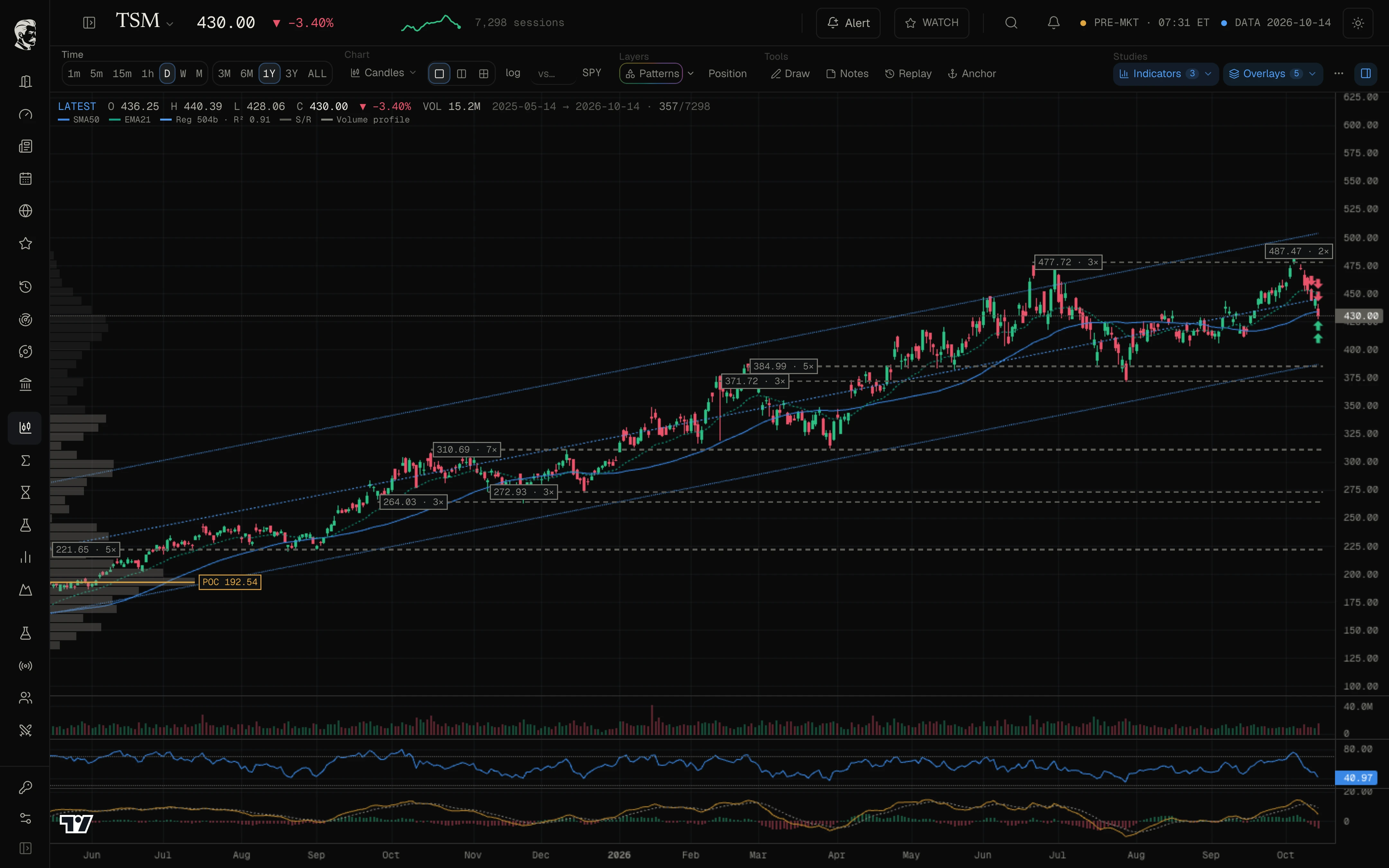
  1. Step 1 of 5: Read the structure.

    Support and resistance with how often each level held, the volume profile, a regression channel with its fit, and RSI and MACD underneath.
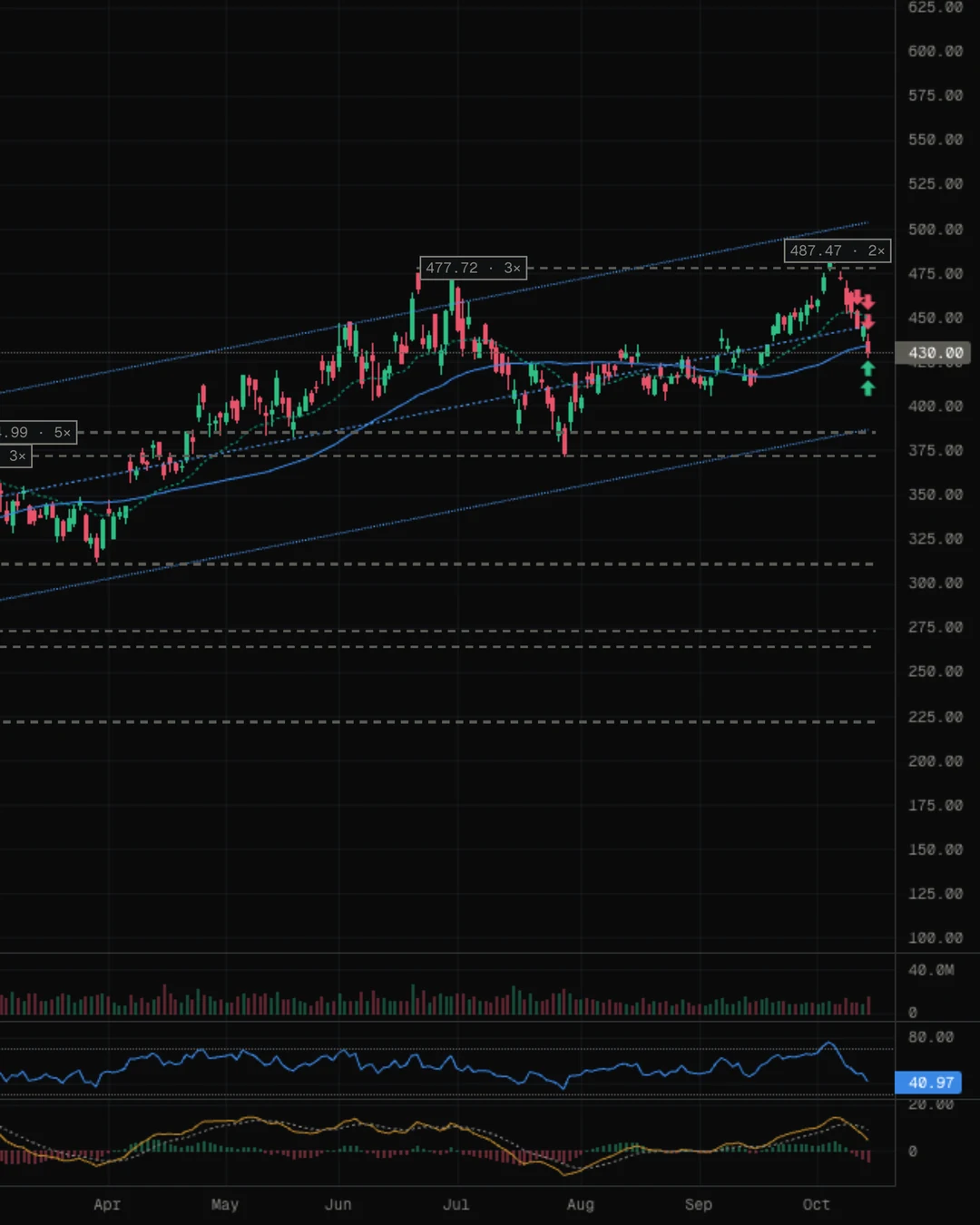
    TSM daily chart in GSM with support and resistance levels, the volume profile, a regression channel and the 21- and 50-day averages, with volume, RSI and MACD panes
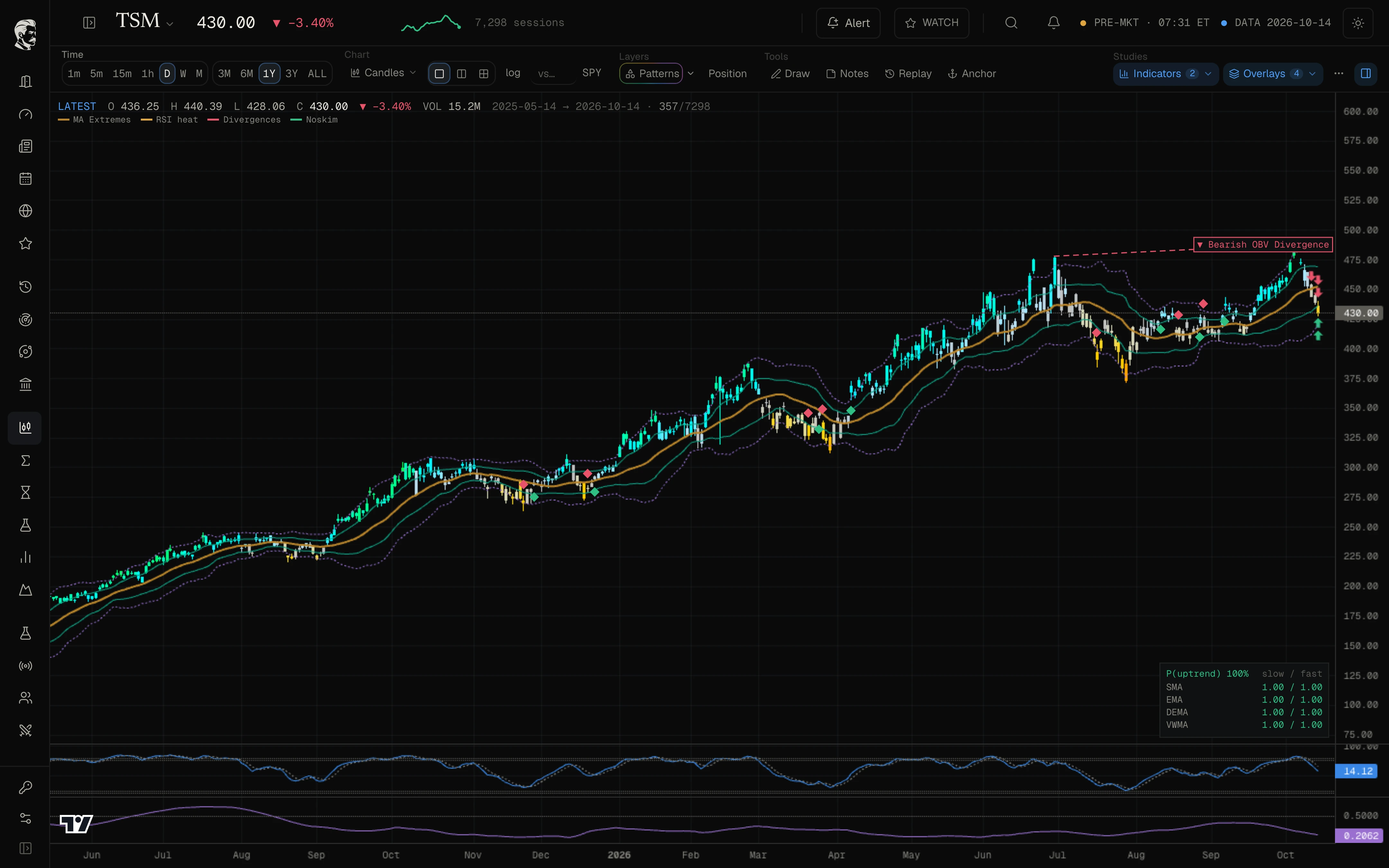
  2. Step 2 of 5: Read the momentum.

    Candles coloured by RSI inside bands that mark a stretched move, divergences flagged where they form, and the odds that the trend is up.
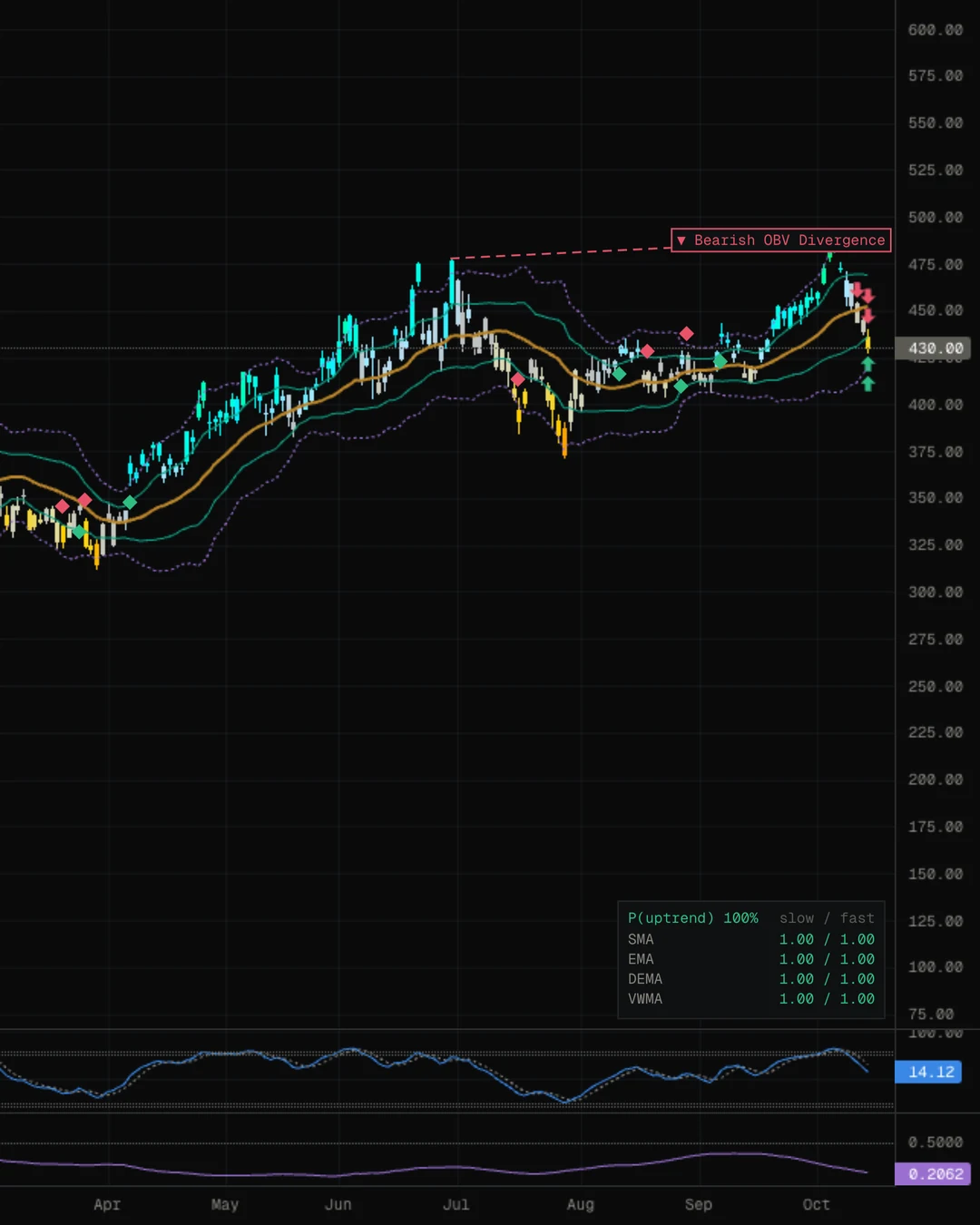
    TSM candles coloured by RSI inside the MA Extremes bands, with a divergence flagged, the Bayesian trend odds and WaveTrend and Hurst panes
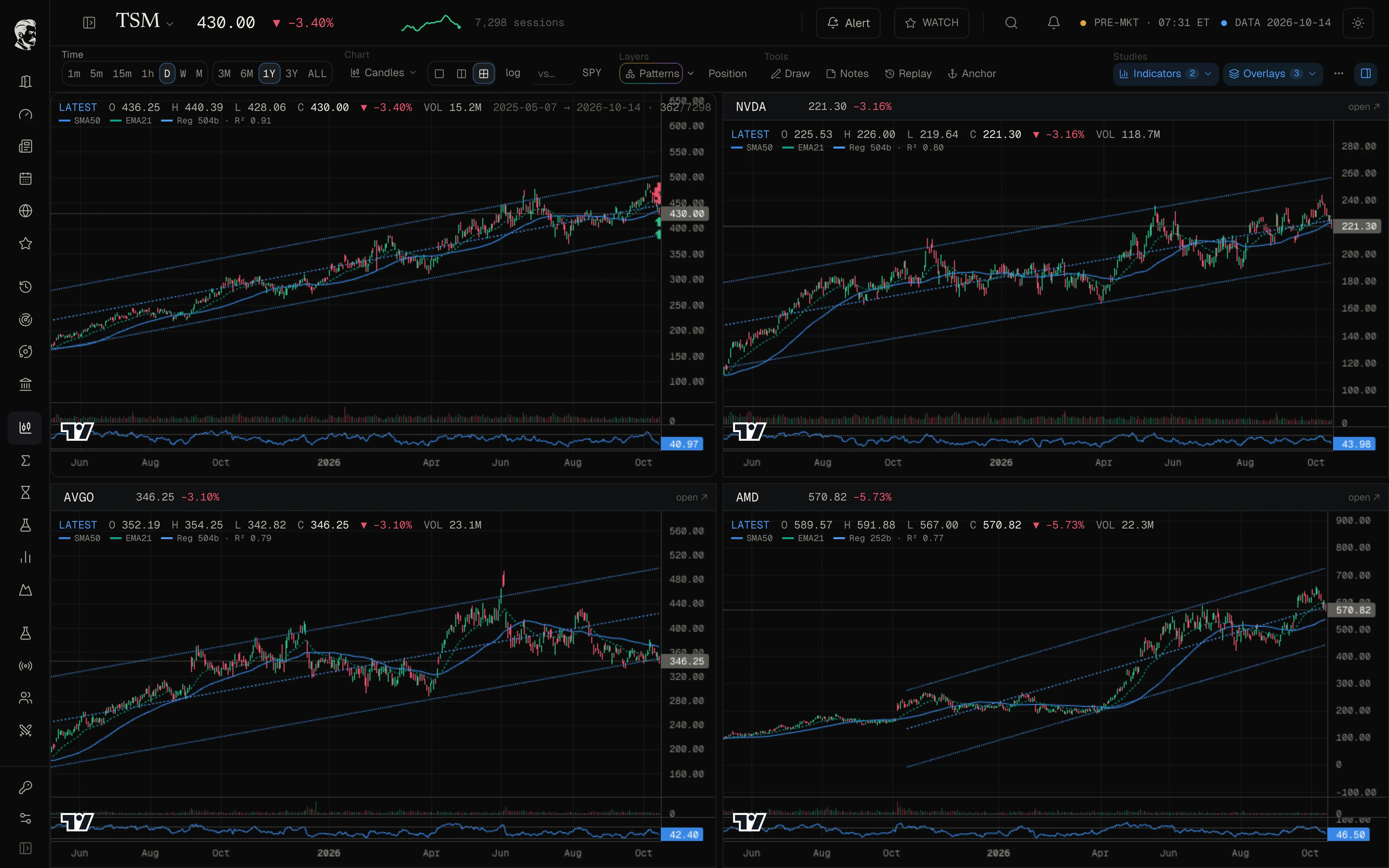
  3. Step 3 of 5: Four charts, one screen.

    Put a stock beside its peers in a 2×2 grid. Every chart carries the same studies and one crosshair moves across all four.
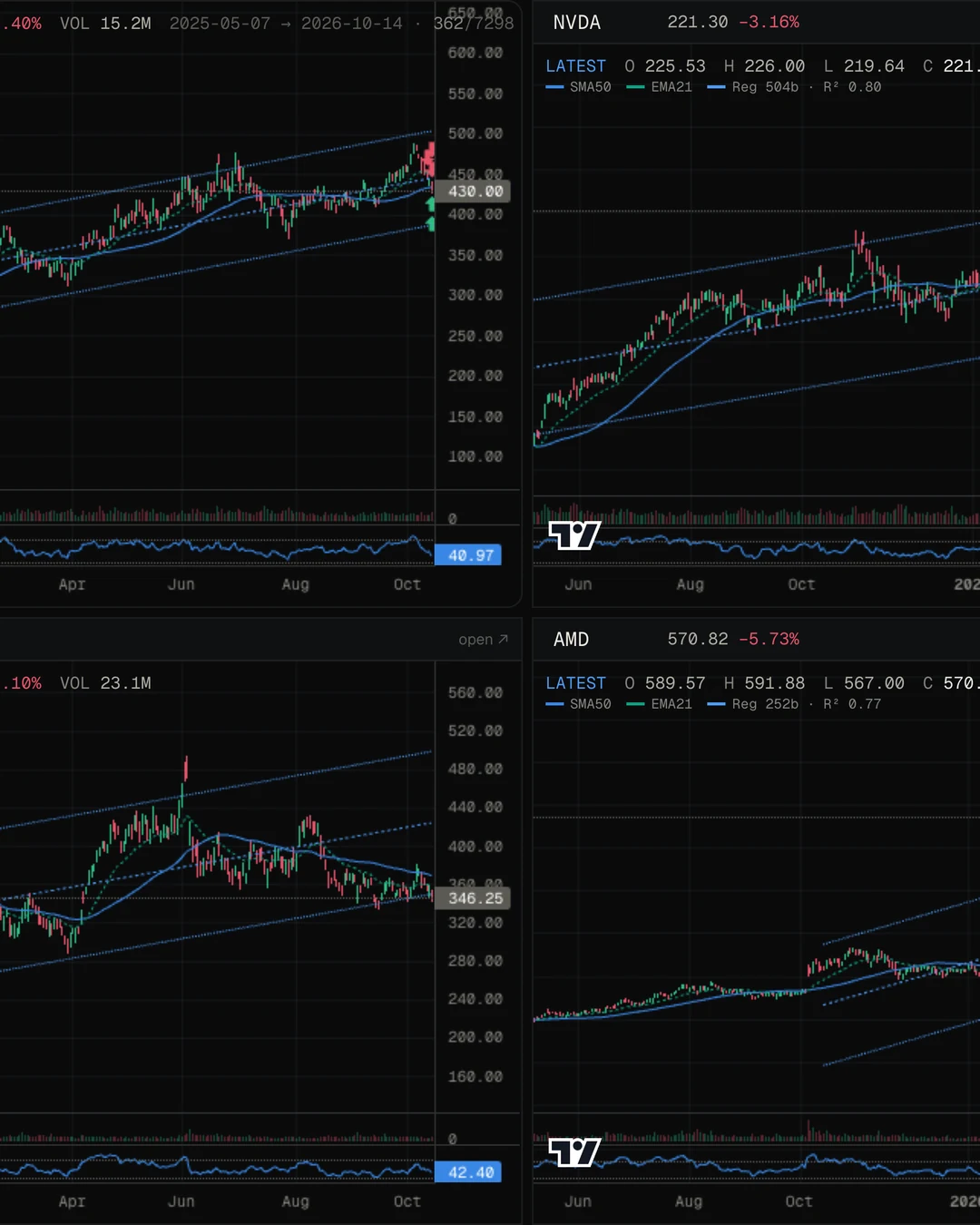
    Four charts in a 2 by 2 grid, TSM, NVDA, AVGO and AMD, each with its regression channel, averages and RSI
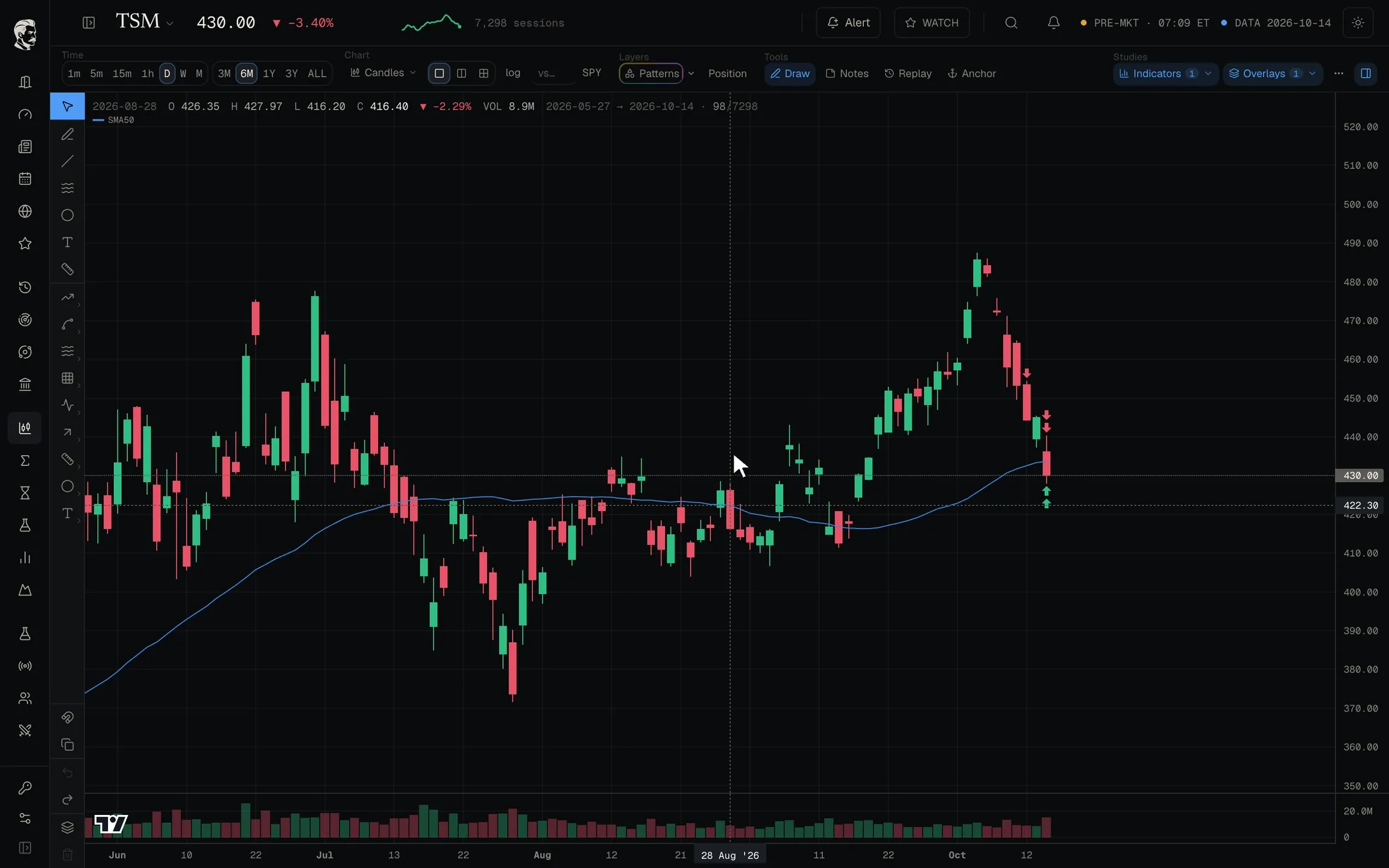
  4. Step 4 of 5: Draw it, then plan it.

    A full drawing kit with a magnet that snaps to the candles: zones, Fibonacci, measured moves, notes, and a position that shows its reward to risk.

    1. A real setup: TSM pulls back after breaking out of its summer base.
    2. Magnet on: every point snaps to a candle's high, low, open or close.
    3. First, mark the base it broke out of.
    4. Fibonacci from the high to the low: 38.2% sits on the old ceiling, 50% on today's price.
    5. How deep is the pullback: 11.9% from the high.
    6. Three supports in one zone: the 50% level, the 50-day average and the old ceiling.
    7. Plan it: long at 430, stop under the base, target the high. Reward to risk: 2 to 1.
    8. Every level is on the chart before the trade, not after.
  5. Step 5 of 5: Then check the statistics.

    How one stock has really behaved, what the whole market is doing, and what followed days like today.

    1. Ticker Stats: how one stock has really behaved, measured on its own history.
    2. Every month of every year at a glance: green up, red down.
    3. How big its daily moves are, and how often the extreme ones come.
    4. And how far it has fallen from its highs, and how long it took to recover.
    5. Market Lab: the whole market on one screen.
    6. Return against volatility for the most traded stocks.
    7. Which sectors move together, and which ones offset each other.
    8. Session Stats: what followed days like today.
    9. The strongest results, each one measured against its base rate.
  1. A real setup: TSM pulls back after breaking out of its summer base.
  2. Magnet on: every point snaps to a candle's high, low, open or close.
  3. First, mark the base it broke out of.
  4. Fibonacci from the high to the low: 38.2% sits on the old ceiling, 50% on today's price.
  5. How deep is the pullback: 11.9% from the high.
  6. Three supports in one zone: the 50% level, the 50-day average and the old ceiling.
  7. Plan it: long at 430, stop under the base, target the high. Reward to risk: 2 to 1.
  8. Every level is on the chart before the trade, not after.
  1. Ticker Stats: how one stock has really behaved, measured on its own history.
  2. Every month of every year at a glance: green up, red down.
  3. How big its daily moves are, and how often the extreme ones come.
  4. And how far it has fallen from its highs, and how long it took to recover.
  5. Market Lab: the whole market on one screen.
  6. Return against volatility for the most traded stocks.
  7. Which sectors move together, and which ones offset each other.
  8. Session Stats: what followed days like today.
  9. The strongest results, each one measured against its base rate.

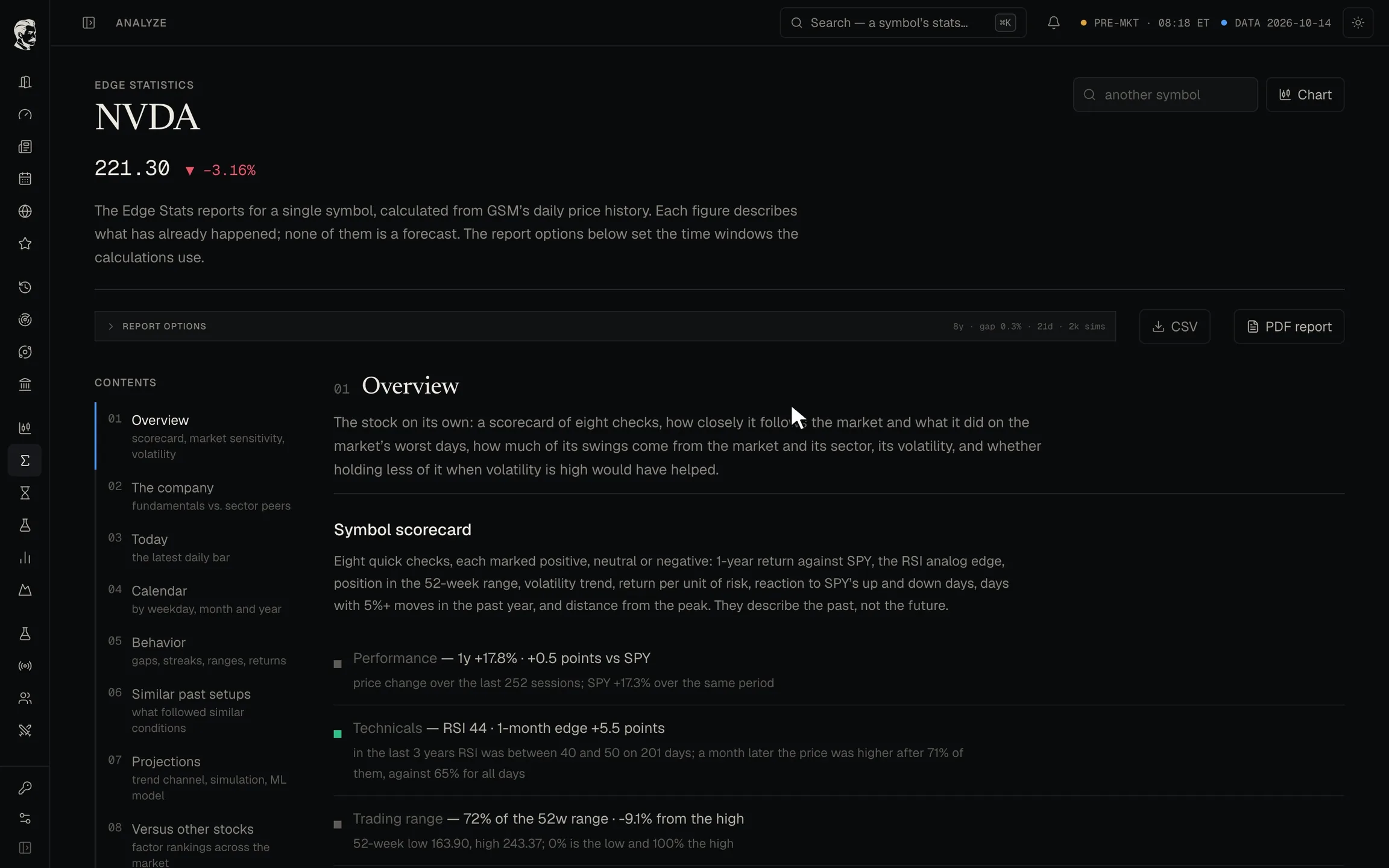
TSM and NVDA on 14 October 2026. Examples, not recommendations.

Turn an idea into a tested strategy.

Combine filters you will not find in other tools, join them with AND and OR, check any of them on weekly bars, set the exit, and see every trade, the curve and the risk in seconds.

Example backtest on QQQ. Hypothetical results; past results do not predict future results.

  1. Pick filters you will not find elsewhere: here, a Bayesian trend model must call the trend up.
  2. Any condition can be checked on weekly bars while the strategy trades daily.
  3. Logic gates: AND needs both, OR opens a second way in.
  4. The page writes your rule out in plain English as you build it.
  5. No fixed target: a trailing stop lets the winners run.
  6. Run it on QQQ: every trade, the curve and the risk, in seconds.
  7. The verdict comes first, then the equity curve against buy and hold.
  8. The worst drop was 8% against 35% for buy and hold, with 68% winning trades.

Build the desk you open every morning.

Pin a chart with its indicators, star any panel in Ticker Stats or The Economy, then drag, resize and play with every card on one screen.

  1. Pin any chart to your dashboard, indicators included.
  2. In Ticker Stats, star a panel and it joins the same desk.
  3. The Economy works the same way: star the yield curve history.
  4. Everything you starred is on your desk, and any other card can join it.
  5. Pull an edge to resize a card.
  6. Drag a card by its header and the rest of the desk makes room.
  7. Every card stays live: turn the 3D surface by hand.
  8. Or scrub the yield curve back through the years.

Follow the money, sector to stock.

Press play and watch the sectors rotate, pause on any week, click a sector on the graph for its industries and two industries for their stocks, then run all four graphs on one clock.

See what is pushing a stock.

Every indicator behind a stock's reading becomes a hill or a valley. Replay the year day by day and watch the landscape move with the price.

The economy, and what moves with the market.

The state of the US economy on one screen, every figure with its trend. Put any series beside the S&P 500 and see how closely the two have moved together.

  1. The state of the US economy on one screen, every figure with its trend.
  2. Compare any series with the S&P 500: here, margin debt.
  3. As yearly change, the two move together: correlation r = 0.84.
  4. Add copper, and every pair gets its own correlation.

And the rest of the desk.

Every tool is one click from the chart, and every one of them is built to answer one question fast.

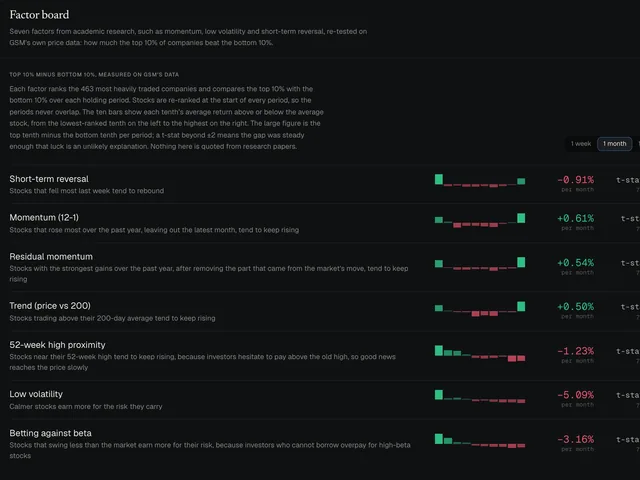
The factor board: each factor's return spread between the top and bottom tenth of stocks, with its strength

Factor board

Momentum, reversal, low volatility and more, each re-tested on US stocks, with how strong the effect has been lately.
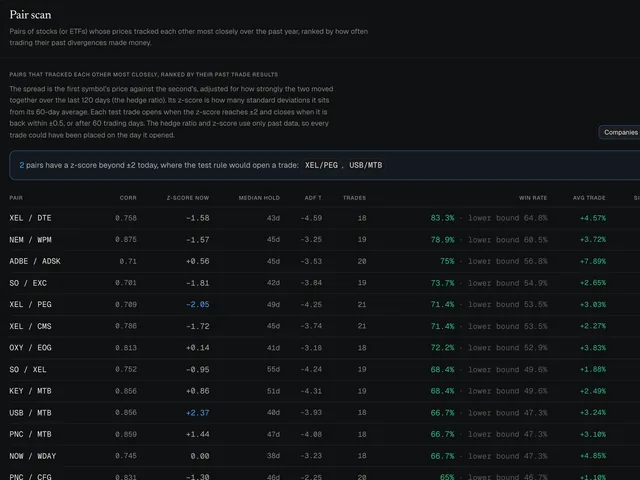
The pair scan: pairs of stocks with their correlation, how far apart they are now and the record of past trades

Pair scan

Pairs of stocks that move together, ranked by how often a stretch between them has snapped back.
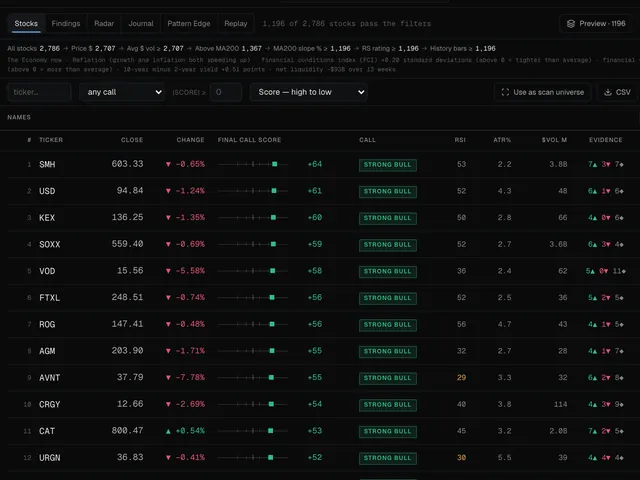
The scanner's Momentum Leaders list, ranked, with each stock's reading and evidence

Scanner

A ranked shortlist from the whole US market in one click, with the reasons beside each name.
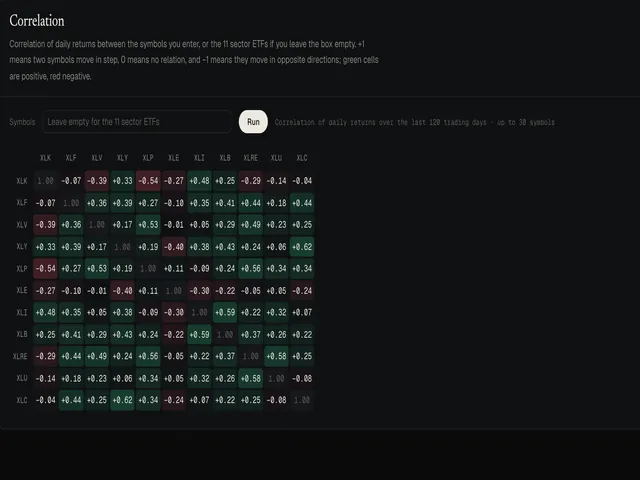
A correlation matrix of the eleven sector funds, green for together and red for apart

Correlation

Which sectors move together and which pull apart, in one matrix you can point at any list.
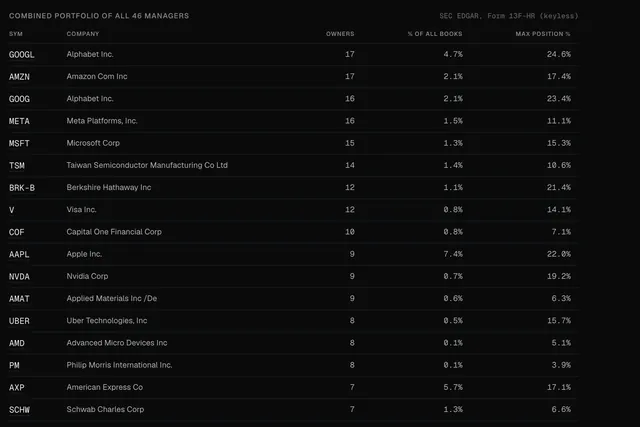
The combined portfolio of the tracked funds: each stock, how many of them own it and its weight

Smart Money

What the best-known funds own, together, straight from their own quarterly filings.
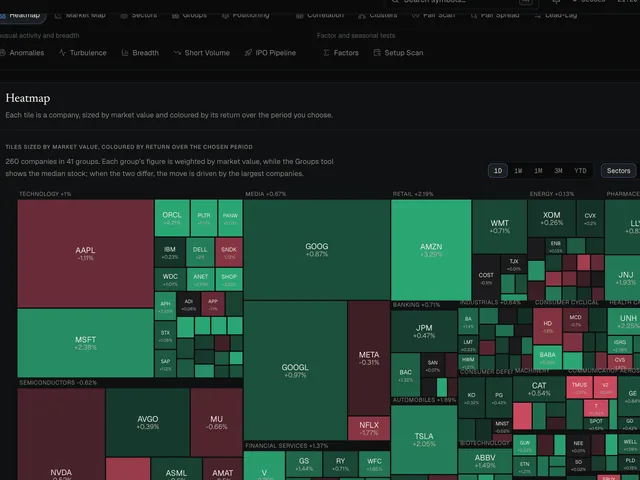
A heatmap of the largest US companies, sized by value and coloured by the day's move

Market Lab

The whole market at a glance: heatmaps, sectors, groups, breadth and turbulence.

And the daily routine.

  • A morning digest of the day, before the open
  • Alerts and live rules that watch your levels
  • Screen Replay: any screen, tested on the past
  • Watchlists and the earnings calendar
  • An academy of lessons, each on a real chart

One desk instead of ten tabs.

Charts in one tab, a screener in another, a backtester somewhere else and the economy in a spreadsheet. GSM puts all of it on one desk.

  • Charts with patterns
  • Support & resistance
  • Strategy Lab
  • Position plans
  • Dashboards
  • Sector rotation
  • Force
  • The Economy
  • Ticker Stats
  • Scanner
  • Factor board
  • Pair scan
  • Screen Replay
  • Smart Money
  • Market Lab
  • Morning Digest
  • Alerts & live rules
  • Watchlists
  • Academy

And when a chart has nothing to say, GSM says so: NO EDGE.

Gavino Sabacci’s Moneymaker

Questions, answered.

Anything else? Write to [email protected].

What is GSM?

GSM, short for Gavino Sabacci’s Moneymaker, is a market desk for US stocks. It draws chart patterns, key levels and trend models on your chart, and puts a strategy builder, factor boards, dashboards, a scanner, sector rotation and the economy beside it, in one place.

Which markets does it cover?

US-listed stocks and ETFs, from daily charts down to intraday ones, and the US economy.

Does GSM tell me what to buy or sell?

No. It shows what the chart, the market and the stock's own history say, including when they say nothing: then it says NO EDGE. It does not know your goals, your money or your situation, and every decision stays yours.

Can GSM trade for me?

No. GSM does not connect to a broker, never holds money and never places an order.

What do I need to use it?

A web browser. GSM runs in the browser and is built for a computer screen; it also works on a tablet or a phone. There is nothing to install.

How do I get access?

GSM is in private beta. Write to [email protected] with what you trade and the tools you use today.

What does this website do with my data?

Nothing that identifies you. It sets no cookies, counts visits without cookies or personal data, and keeps your accessibility choices in your own browser. The details are in the privacy notice.

Start with one stock.

GSM is in private beta. Tell us what you trade.